Raspberry Pi 3 vs 4 vs 5 for self-hosting: websites, Nextcloud and a solar-powered server
· 7 min read · by Adrien Lopez
Which Raspberry Pi should you choose to host a website, Nextcloud or your own services at home? We compare the Raspberry Pi 3, 4 and 5 (and what may come next), explain how little energy they use, and show eco-friendly and sovereign projects, up to running a Raspberry Pi on a solar panel.
A credit-card-sized computer that uses less power than a light bulb can host your website, your files, your calendar and your password manager. The Raspberry Pi has become the favourite tool of people who want to take their data back from big platforms, and it is also one of the most energy-efficient ways to run a server at home or in the office.
In this article we compare the Raspberry Pi 3, 4 and 5, look at what may come next, list what you can self-host on them, and finish with eco-friendly and sovereign projects, including a Raspberry Pi running on a solar panel.
Raspberry Pi 3 vs 4 vs 5
| Raspberry Pi 3 Model B+ | Raspberry Pi 4 Model B | Raspberry Pi 5 | |
|---|---|---|---|
| Released | 2018 | 2019 | 2023 |
| Processor | 4 × Cortex-A53, 1.4 GHz | 4 × Cortex-A72, 1.5 to 1.8 GHz | 4 × Cortex-A76, 2.4 GHz |
| Memory | 1 GB | 1, 2, 4 or 8 GB | 2, 4, 8 or 16 GB |
| Network | Gigabit port limited to about 300 Mbit/s (shared USB 2.0) | Full Gigabit Ethernet | Full Gigabit Ethernet |
| Storage | microSD, USB 2.0 | microSD, USB 3.0 SSD | microSD, USB 3.0, NVMe SSD through PCIe (M.2 HAT) |
| Power supply | 5 V, 2.5 A | USB-C, 5 V, 3 A | USB-C, 5 V, 5 A (27 W supply recommended) |
| Typical consumption | about 2 W idle, 5 W under load | about 3 W idle, 6 to 7 W under load | about 3 W idle, 8 to 12 W under load |
| Relative CPU speed | 1× | about 3× | about 6 to 9× |
| Best for | DNS ad blocker, VPN, small static site | Nextcloud for a family, home automation, small websites | Nextcloud for a small team, several services at once, light containers |
Consumption depends on connected devices (an SSD adds 1 to 3 W) and on the workload. Prices change with memory costs: check current prices from official resellers.
Which one should you buy?
- Raspberry Pi 5 with 4 or 8 GB and an NVMe SSD: the best choice for a new self-hosting project today. The NVMe SSD is the real game changer: much faster and far more reliable than a microSD card, which tends to wear out under database writes. Plan an active cooler (official case with fan or Active Cooler).
- Raspberry Pi 4 with 4 GB and a USB 3.0 SSD: still excellent if you already have one or find it cheaper. Slightly lower consumption under load.
- Raspberry Pi 3: don't buy it for a new server, but reuse the one in your drawer for light services (Pi-hole, WireGuard VPN, a static website). Keeping a working device in use is the most eco-friendly option of all.
- Raspberry Pi Zero 2 W: tiny and very frugal (under 1 W idle), with only 512 MB of memory: perfect for sensors, a solar experiment or a single lightweight service.
What comes next?
The Raspberry Pi Foundation has released a new flagship roughly every four years (2019 for the Pi 4, 2023 for the Pi 5), and has kept adding variants in between: more memory options, the Raspberry Pi 500 keyboard computer and the Compute Module 5 for industrial projects. No Raspberry Pi 6 has been announced at the time of writing. Whatever comes next, the Pi 4 and Pi 5 are supported for many years, so a server built today is a safe investment.
What can you self-host on a Raspberry Pi?
Install Raspberry Pi OS Lite (64-bit) or Ubuntu Server, then pick your services. With Docker you can run several of them side by side.
Websites
- Static websites (HTML, Next.js static export, Hugo...) served by Caddy or nginx: a Raspberry Pi 4 or 5 easily handles the traffic of a personal site or a small business site. Caddy also manages HTTPS certificates automatically.
- WordPress or other PHP sites: possible on a Pi 4 or 5 with an SSD, for low to moderate traffic. Add a cache plugin.
- To make the site reachable from the internet, open a port on your router or, if your provider blocks it, use a small European VPS as a relay through a WireGuard tunnel.
Nextcloud
Nextcloud turns a Raspberry Pi into your own cloud: files, photo backup from your phone, calendars, contacts, tasks and notes, all synchronised with your devices. Recommended setup:
- a Raspberry Pi 5 with 8 GB of memory (4 GB is enough for a family),
- an NVMe or USB 3.0 SSD for the system and data, never the microSD card alone,
- Nextcloud All-in-One (Docker) or the community project NextcloudPi for an easy installation and automatic updates,
- an external backup with BorgBackup or restic, ideally to a second location.
The office suite (Collabora or OnlyOffice) works on a Pi 5 for occasional use; for a team that edits documents all day, choose a bigger server.
Other useful services
- Pi-hole or AdGuard Home: blocks ads and trackers for the whole network.
- WireGuard: a VPN to reach your home network securely from anywhere.
- Vaultwarden: a lightweight server for the Bitwarden password manager.
- Home Assistant: home automation that works locally, without depending on a manufacturer's cloud.
- Syncthing: file synchronisation between devices, without any central server.
- Uptime Kuma: monitoring for your sites and services.
Low consumption, real savings
A server running 24 hours a day, 365 days a year consumes:
| Server | Average power | Energy per year | Cost per year at €0.25/kWh |
|---|---|---|---|
| Raspberry Pi 4 or 5 with SSD | 5 W | about 44 kWh | about €11 |
| Mini PC | 15 W | about 131 kWh | about €33 |
| Old desktop PC used as a server | 60 W | about 526 kWh | about €131 |
The Raspberry Pi wins clearly, and the carbon footprint of its manufacturing is also small compared to a full-size computer. Three habits make it even greener:
- Reuse older boards for light tasks instead of buying new ones.
- Mutualise: one Pi 5 with Docker can replace several devices and subscriptions.
- Choose durable storage: an SSD lasts much longer than microSD cards that need replacing.
Running a Raspberry Pi on solar power
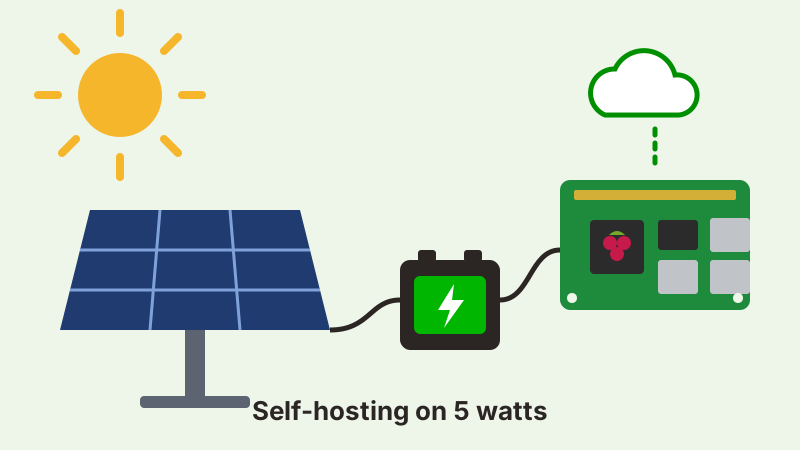
Because it needs so little energy, a Raspberry Pi is one of the few servers you can realistically run off-grid on a solar panel. A typical setup:
- A solar panel of 50 to 100 W.
- A solar charge controller, ideally MPPT, which protects the battery and gets the most out of the panel.
- A 12 V battery, preferably LiFePO4 (lithium iron phosphate) for its long life and safety, of 20 to 50 Ah.
- A good quality 12 V to 5 V converter (buck converter) able to deliver the current your Pi needs (3 A for a Pi 4, 5 A for a Pi 5).
- Optional: a UPS HAT or a voltage monitor, so the Pi shuts down cleanly when the battery is low.
How to size it: a Pi using 5 W needs about 120 Wh per day. A 12.8 V, 20 Ah LiFePO4 battery stores about 256 Wh, enough for about two days without sun. In summer a 50 W panel is plenty; in winter, especially in northern Europe, days are short and cloudy, so choose a 100 W panel and a bigger battery, or accept that the server may pause during the darkest weeks.
The best-known example is Low-tech Magazine, which has published its website from a small solar-powered server since 2018. The site is designed to be very light, shows the battery level on each page, and simply goes offline when the battery is empty: a beautiful demonstration that the web can run on the sun.
More projects for sovereignty and ecology
- YunoHost and FreedomBox: Debian-based systems that make self-hosting simple, with one-click apps (Nextcloud, email, Matrix chat, wiki, blog...).
- GoToSocial: a lightweight Fediverse server, compatible with Mastodon, that runs comfortably on a Raspberry Pi. Your social media identity, on your own domain.
- Kiwix: an offline Wikipedia and educational library, served on a local Wi-Fi network: perfect for schools, associations or places without internet.
- A weather or air quality station with open sensors, publishing open data.
- A local backup node for friends and family: everyone backs up encrypted data to each other's Raspberry Pi, without a big cloud provider.
Conclusion
A Raspberry Pi 5 with an SSD is today one of the simplest, cheapest and greenest ways to host a website, a Nextcloud and a few useful services, under your control and out of reach of extraterritorial laws. And if you want to go further, a solar panel and a battery are enough to make it energy independent.
Ad Ventures Limited can help you choose the hardware, install and secure Nextcloud and your services, and set up backups. Tell us about your project.